Teaching your agent Redmine plugin APIs
此内容尚不支持你的语言。
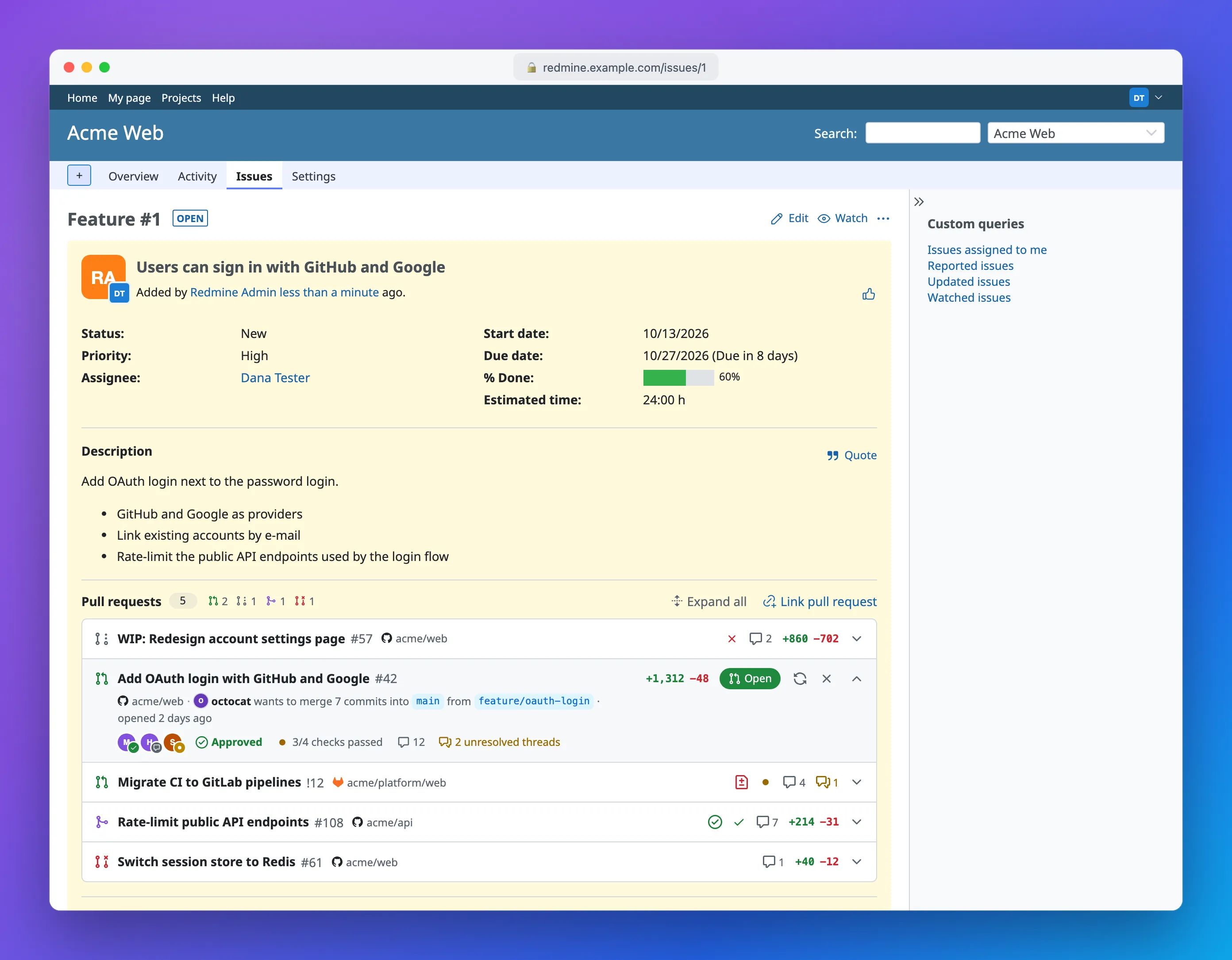

Many Redmine instances run plugins, and some of those plugins add their own REST endpoints. redmine-cli covers the core Redmine API with dedicated commands, but it can’t ship commands for endpoints that only exist on your server. Your AI agent has never seen them either. Ask it about one and it either gives up or starts guessing URLs and building curl calls with your API key pasted into them.
This post shows a setup with two pieces:
redmine apisends authenticated requests to any endpoint, including plugin endpoints.- A short Agent Skill tells the agent which endpoints exist and how they behave.
The example plugin
Section titled “The example plugin”The example in this post is Redmine Pull Requests, a plugin I wrote to link GitHub pull requests and GitLab merge requests to Redmine issues. The issue page then shows the state, reviewers, checks and unresolved threads of each linked pull request:
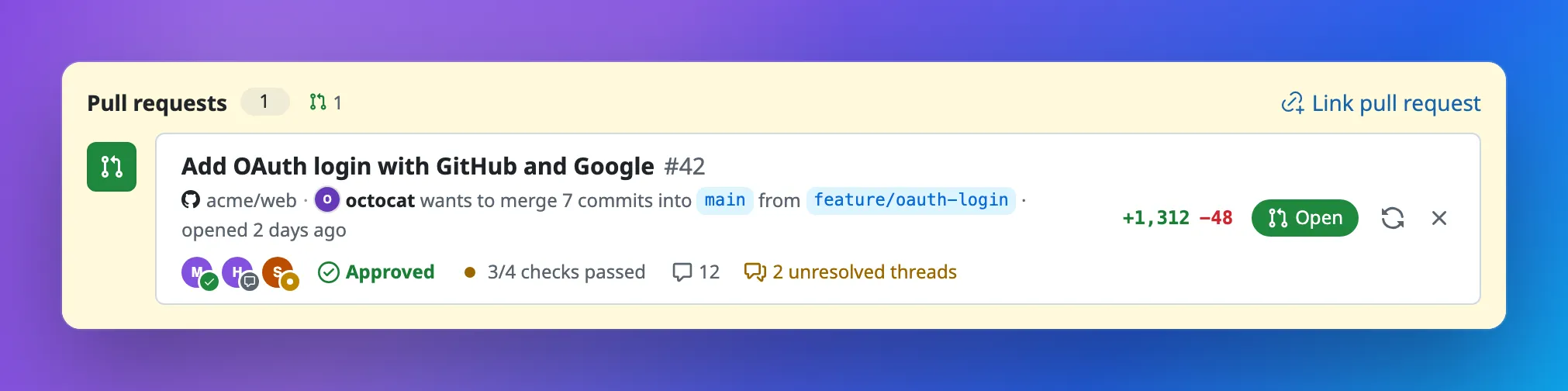
It’s a good example because it has its own REST API, and that API does things you can’t guess:
- the endpoints are nested under the issue:
/issues/:issue_id/pull_requests.json; :idin the URL is the plugin’s own record ID, not the pull request number on GitHub;- each project has to allow a repository before its pull requests can be linked;
- linking takes up to 20 URLs at once, and if one of them is rejected, none of them are linked;
- refreshing a pull request is a
POSTwithout a body.
An agent can’t work any of this out by itself, so it goes into the skill.
Step 1. Explore the endpoint with redmine api
Section titled “Step 1. Explore the endpoint with redmine api”redmine api sends a request to the configured server and prints the response. It reuses everything the active profile already has: the server URL, the API key or basic auth, custom HTTP headers for reverse proxies, and read-only mode. The API key never shows up on the command line, in shell history, or in the agent’s context.
Start by looking at the raw response, including status and headers:
redmine api /issues/1234/pull_requests.json -iOnce you know the shape, extract what you need with the built-in --jq filter. You don’t need jq installed:
redmine api /issues/1234/pull_requests.json \ --jq '.pull_requests[] | "\(.reference) \(.status) \(.review_decision) \(.checks.state)"'acme/web#42 open approved pendingacme/api#17 merged approved successOn a 4xx or 5xx response, redmine api exits with code 1. With --jq or -o json, it writes the error to stderr as the same JSON error envelope every other command uses, and stdout stays empty. Scripts and agents can rely on the exit code instead of parsing error text.
Step 2. Write data
Section titled “Step 2. Write data”For writes, -F builds a JSON body from key=value pairs and switches the method to POST. Numbers, booleans, arrays and objects keep their JSON type. Anything else is sent as a string, including JSON with a typo in it, so check the quotes. A value that looks like a number is sent as one, so -F 'name=1.10' sends 1.1. Inside a JSON object, strings stay strings. Linking two pull requests to issue 1234 looks like this:
redmine api /issues/1234/pull_requests.json \ -F 'pull_request={"urls":["https://github.com/acme/web/pull/42","https://gitlab.com/acme/platform/web/-/merge_requests/7"]}'For longer payloads, pipe the body in with --input -:
redmine api /issues/1234/pull_requests.json --input - <<'EOF'{ "pull_request": { "urls": [ "https://github.com/acme/web/pull/42", "https://gitlab.com/acme/platform/web/-/merge_requests/7" ] }}EOFEndpoints without a body need an explicit method, because redmine api only defaults to POST when there is a body:
# Reload a pull request from GitHub (5 is the plugin's ID, not the PR number)redmine api -X POST /issues/1234/pull_requests/5/refresh.json
# Unlink itredmine api -X DELETE /issues/1234/pull_requests/5.json
Step 3. Write the skill
Section titled “Step 3. Write the skill”Now turn what you learned into an Agent Skill. A skill is a folder with a SKILL.md file. The agent reads the description to decide when the skill applies and loads the rest only when it needs it.
The bundled redmine-cli skill already teaches the agent how to use the CLI: --jq, exit codes, --help, permission errors. The plugin skill builds on it and only covers what is specific to the plugin:
---name: redmine-pull-requestsdescription: Read and manage GitHub pull requests and GitLab merge requests linked to Redmine issues (Redmine Pull Requests plugin). Use when the user asks whether an issue's PRs are merged, approved or green, wants to link a PR or MR URL to an issue, refresh or unlink one, or asks if an issue is ready to close.---
# Redmine Pull Requests plugin
The plugin has no dedicated CLI command. Use `redmine api`, which reuses theactive profile's auth. Never call these endpoints with curl and never handlethe API key yourself.
## Endpoints
| Purpose | Command ||---------|---------|| List PRs of an issue | `redmine api /issues/<issue>/pull_requests.json` || One PR | `redmine api /issues/<issue>/pull_requests/<id>.json` || Link PRs by URL | `redmine api /issues/<issue>/pull_requests.json -F 'pull_request={"urls":["<url>", ...]}'` || Reload from GitHub/GitLab | `redmine api -X POST /issues/<issue>/pull_requests/<id>/refresh.json` || Unlink | `redmine api -X DELETE /issues/<issue>/pull_requests/<id>.json` |
## Rules
- `<id>` is the plugin's record ID from the list response, NOT the PR number.  Look it up first, for example with  `--jq '.pull_requests[] | select(.reference == "acme/web#42") | .id'`.- The list returns all linked PRs at once. There is no pagination.- Link at most 20 URLs per request.- The plugin only links repositories that the project settings allow. A 422 that  says a repository "is not allowed in this project" or that no repositories  are allowed yet can't be fixed with the API. Tell the user to ask a project  manager to allow it (Project » Settings » Pull requests).- Linking is all or nothing. After a 422, the plugin has linked nothing.  Report the errors from the response and don't retry the same URLs.- Linking the same URL twice is fine, it is idempotent.- `state` is `open`, `merged` or `closed`. `status` also has `draft`.- `review_decision` is `approved`, `changes_requested`, `review_required` or null.- `checks.state` is `success`, `failure`, `pending` or `neutral`. `checks` is  missing until checks or a pipeline exist. On GitLab, `total`, `passed` and  `failed` are null.- Data can be stale. If the user needs the current state, refresh first. If  the refresh is refused (403 or read-only mode), answer from the listed data  and say when it was last synced (`synced_on`).- A 403 when listing means the role lacks *View pull requests*, the project  doesn't have the *Pull requests* module enabled, or the user can't see the  issue. Stop and tell the user.- Ask before unlinking. Show the user which PR you are about to unlink.- Never pass `--read-only=false`. If a write is refused, tell the user.- Only use the profile the user set up for you. Never switch profiles or pass  `--server` or `--api-key`.
## "Is this issue ready to close?"
Ready means at least one PR is linked and every linked PR has `state``merged`. Combine with `redmine issues get <issue>` for the issue's own status.
Skills follow an open standard, so the same file works in Claude Code, Codex, Gemini CLI, Cursor, Copilot and the other agents that support it. Only the folder differs. The cross-vendor .agents/skills/ folder works for many agents, and some use their own, such as .claude/skills/ or .gemini/skills/. Check your agent’s documentation for the exact path. If you commit the skill to the repository, everyone on the team gets it.
Now ask the agent “is #1234 ready to close?”. It lists the linked pull requests, sees that acme/web#42 is still open with checks pending, and tells you so, without guessing a single URL or touching your API key.
A few things that make skills like this work well:
- Write the description for the trigger. The agent matches requests against it, so describe the questions users ask, not the plugin’s architecture.
- Only write down what the agent can’t find out. Endpoint paths, payload shapes, allowed values and pitfalls belong in the skill. General CLI usage is already in the redmine-cli skill.
- Put guardrails in the skill. If an endpoint is destructive, say so and say what to do instead.
- Keep it short. A skill that fits on one screen is easy to keep in sync with the plugin.
Step 4. Limit what the agent can change
Section titled “Step 4. Limit what the agent can change”redmine api can call any endpoint with any method, so decide what the agent should be allowed to do:
- A dedicated Redmine user limits the agent to what that user’s role allows. For example, give the role View pull requests but not Manage pull requests. This only holds if the agent can’t reach your own credentials.
--profileandredmine auth switchare conventions the agent can ignore, and it can read~/.redmine-cli.yamllike any other file. Run the agent in a container or as a separate OS user whose config file only has the agent user’s profile. - Read-only mode blocks every
POST,PUT,PATCHandDELETErequest before the CLI sends it. Setread_only: trueon the agent’s profile, orREDMINE_READ_ONLY=1for a session. It catches accidental writes, but it doesn’t stop an agent that wants to write, because--read-only=falseturns it off for a single command. That’s why the skill above tells the agent never to pass it.
- Explore the plugin endpoint with
redmine api -iand--jq. - Work out the write payloads with
-FJSON values or--input -. - Write down endpoints, payloads, allowed values and pitfalls in a short
SKILL.md. - Give the agent its own Redmine user and no access to yours, and turn on read-only mode until you trust it with writes.
The same pattern works for any plugin with a REST API, whether it’s a community plugin or one your team wrote years ago. If you want pull request state on your Redmine issues, try Redmine Pull Requests. It supports GitHub and GitLab on Redmine 5.0 to 7.0.